Make your first loop
This short walkthrough continues from Quick start, which ends on Project after saving:
- Return to Song.
- Open Chain 00.
- Open Phrase 00.
You should now see C3 I00 at row 00, and Instrument 00 should be set to
OPAL.
1. Place four notes
Keep the cursor in the NOTE column.
- Tap Down four times to reach row
04, then tap Enter. - Tap Down four more times to reach row
08, then tap Enter again. - Tap Down four more times to reach row
0C, then tap Enter once more.0Cis hexadecimal row index 12.
Each new row reuses the most recent note and instrument, so all four rows should
show C3 I00:
00  C3  I00
04  C3  I00
08  C3  I00
0C  C3  I00
Rows between them stay empty. That spacing creates an even four-beat pulse.
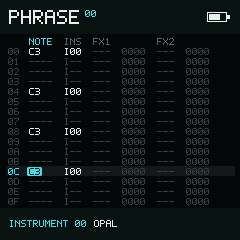
The four notes are evenly spaced across the 16-row Phrase.
2. Hear the loop
Tap Play. The four notes should repeat in order, and a filled triangle appears in the top bar while playback is running. Tap Play again to stop.
If only the first row makes sound, check that rows 04, 08, and 0C each
show both a note and I00. If nothing plays, return to Instrument 00 and check
that its Type is OPAL.
3. Shape the melody
Stop playback, then try changing two notes:
- On row
04, hold Enter and tap Right. The note moves to the next note in the project scale. With the default Chromatic scale,C3becomesC#3. Release Enter when it sounds right. - On row
08, hold Enter and tap Up. The note moves up one octave. Release Enter to finish the edit.
Tap Play again. You should now hear the same rhythm with a changing pitch.
4. Keep it
Return to Project with twice, then . Keep the
cursor on Name, move the bottom-bar choice to Save, and press Enter. If the
project is still UNTITLED, NullPerator asks for a name first and then
continues the save. Wait for the saving mark to disappear before closing the
app, powering off, or removing storage.
Next
- Learn how Chain plays phrases in order.
- Arrange chains across eight tracks in Song and Live.
- See every Phrase field in the Phrase guide.