Theme and font
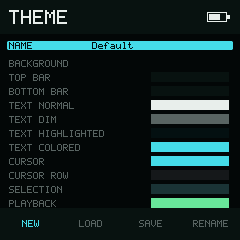
Theme exposes semantic color roles instead of hue-specific names.
Theme page
Theme colors are named by where they are used, such as text.normal or
system.warning. This lets one palette restyle the complete interface.
Select NAME to choose NEW, LOAD, SAVE, or RENAME in the bottom
bar. Select a color row to edit its RGB channels:
- Left and Right choose R, G, or B.
- or changes the selected component by ±1.
- or changes it by ±10.
- resets the selected component to its default.
- Every component is clamped to 0–255.
Changes preview immediately and are saved when you leave the page.
The 20 editable roles
| Group | Semantic roles |
|---|---|
| Surfaces | surface.bg, surface.top_bar, surface.bottom_bar |
| Text | text.normal, text.dim, text.highlighted, text.colored |
| Editing | cursor.primary, cursor.row, selection.active, playback.active |
| System | system.info, system.warning, system.error |
| Battery | battery.normal, battery.charging, battery.low |
| VU | vu.safe, vu.warning, vu.peak |
Faint text, cursor corners, muted playback color, VU track color, and gradient steps are generated from these roles. They are intentionally not extra user settings.
The editor previews exactly what the current values produce; it does not enforce
a minimum contrast ratio. Keep text.normal distinct from surface.bg, and
keep cursor, selection, and playback roles visibly separate from both the row
background and their text. If a theme becomes difficult to navigate, use
NEW to restore the default palette before saving again.
NEW, LOAD, SAVE, and RENAME
- NEW restores the default semantic colors, then asks for a theme name.
- LOAD opens the Theme Browser. Select a theme and choose IMPORT.
- SAVE exports the current settings. An existing destination requires an overwrite confirmation.
- RENAME changes the active theme name through the keyboard page.
Theme names may contain up to 16 characters and follow the same single-path- component safety rules as project names.
Share a theme
NullPerator themes use .npt files in the Themes folder. Load and save them
through the Theme page so NullPerator can check that the file is complete before
changing your live colors.
Renaming an older theme file to .npt does not convert it. If a theme is
rejected, your current colors stay unchanged.
Font page
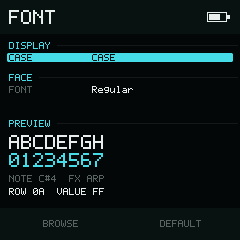
Font keeps text-case behavior separate from user-authored names.
The Font page has two fields: CASE and FONT.
Text Case
Use Left and Right on CASE to cycle among:
| Choice | UI labels become |
|---|---|
Case | Title-style words |
CASE | Uppercase |
case | Lowercase |
This preference changes built-in interface labels, including the displayed Theme and Font names in Device → Display. It does not rename their files. User-authored project, instrument, sample, file, and path names preserve the case that was entered. The choice is saved in device configuration.
Font actions in 0.1
The bottom bar offers BROWSE and DEFAULT:
- DEFAULT is implemented. It restores the built-in Regular face and saves the configuration.
- BROWSE is not available in NullPerator 0.1 and reports
FONT BROWSER UNAVAILABLE.
Only the built-in Regular face is available in 0.1.