Device settings
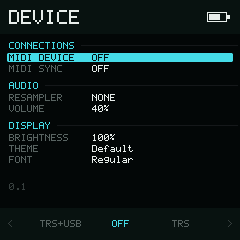
Device settings use the same scrollable-list and contextual-bottom-bar system as Project and Instrument.
Device settings belong to the installation, not to the current project. A
change is applied immediately where the platform supports it and saved
automatically. If saving fails, CONFIG SAVE FAILED appears so you can try
again.
Use Up and Down to choose a row. Selector rows change directly with Left and Right; Enter is not required. Hold Enter while using Up or Down for ±10 steps on numeric rows. Holding a direction repeats after the initial delay.
Available rows
| Row | Values | Behavior |
|---|---|---|
| MIDI Device | OFF, TRS, USB, TRS+USB | Selects MIDI output routing and wraps |
| MIDI Sync | OFF, ON | Sends transport clock when on; clamps at the ends |
| Resampler | NONE, LINEAR | Resampling used when importing a sample; wraps |
| Volume | 0%–100% | Output gain, ±1 horizontally or ±10 with or |
| Brightness | 0%–100% | Display control, ±1 horizontally or ±10 with or |
| Theme | Current theme name | Press Enter to open Theme |
| Font | Current font state | Press Enter to open Font |
| Animation | OFF, ON | Enable or disable cursor movement animation; defaults to ON and is saved across restarts |
Web and iOS hide MIDI DEVICE, VOLUME, and BRIGHTNESS. Choose MIDI routes
in the surrounding app's MIDI panel/settings; use its audio controls or the
system volume for output level. The remaining rows use the same controls and
values. Internal Line Out and Update Firmware fields are not exposed on the
current targets.
In Display, Theme and Font names follow the Font page's Case preference.
The footer displays the version of the running build; check it when comparing behavior between hardware, Web, and iOS.
Cursor animation
Set Animation OFF for an immediate cursor move instead of a sliding transition. This changes cursor presentation, not editing, playback timing, or whether the selected value is highlighted.
Brightness safety
The visible percentage maps to a nonzero hardware backlight range. 0% is the
minimum visible brightness rather than a completely black screen, so the
device cannot be made unusable from this row.
Resampler
NONE keeps the import path as direct as possible. LINEAR uses linear
interpolation when a source sample must be converted. This setting affects
future imports; it does not rewrite samples that are already in a project.
Platform differences
The Device page adapts to the services available on each platform:
| Setting | NullPerator hardware | Web | iOS |
|---|---|---|---|
| Volume | Controls the hardware output | Row hidden; use app/system audio controls | Row hidden; use system volume |
| Brightness | Controls the ST7789 backlight | Row hidden | Row hidden; use system brightness |
| MIDI output | Use TRS in NullPerator hardware 0.1 | Row hidden; choose output in the Web MIDI panel | Row hidden; choose a CoreMIDI output in app settings |
| Battery | Device percentage and charge state | No physical battery reported | Device percentage and charge state |
For port setup and the exact MIDI behavior, see MIDI setup and MIDI capabilities.