Table
Tables are reusable 16-step effect sequences. A table can be referenced by a Phrase TBL command or assigned to an instrument, letting effects evolve independently of the Phrase grid.
NullPerator has 32 tables, IDs 00–1F. Each row contains three command/value pairs that advance in parallel.
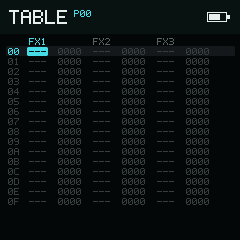
Phrase and Instrument contexts edit the same 32-table bank.
Phrase and Instrument contexts
The top bar prefixes the table number with its entry context:
P00is the Phrase Table context. Enter it from Phrase; if the current Phrase row contains aTBLcommand, its value selects the table.I00is the Instrument Table context. Enter it from Instrument; an assigned instrument table selects the number.
Both contexts edit the same 32-table bank. The prefix records where Up should return and which track/instrument reference should be followed; it is not a second copy of table data.
Hold Shift and press Right from a Phrase Table to inspect the Instrument Table context. Hold Shift and press Left from an Instrument Table to return to Phrase Table context.
Columns
| Pair | Contents |
|---|---|
FX1 + value | First effect lane and four-digit hexadecimal value |
FX2 + value | Second effect lane and four-digit hexadecimal value |
FX3 + value | Third effect lane and four-digit hexadecimal value |
An empty command is ---; an empty value is 0000. The bottom bar normally shows live notes, and replaces them with help when the cursor's FX lane contains a command. During playback, separate marks can show the ordinary table and instrument-automation positions in each FX lane.
Edit commands and values
Directions move through the fixed 16 × 6 grid. On a value cell, tap Enter to recall the last value. On a command cell, Enter opens FX Select and preserves the existing command until you choose another.
Hold Enter to edit:
| Cell | Left / Right | Down / Up |
|---|---|---|
| FX command | Move left / right in FX Select | Move down / up in FX Select |
| Four-digit value | Move the active digit | Decrease / increase that hex digit |
Hold Enter on an FX command to open FX Select. Six-row columns form a fixed directory: Standard, Sample, MIDI, and Synth. All groups stay accessible; the top bar shows the current instrument type. Directions move without wrapping and scroll the list horizontally as needed. Release Enter to close it. Unsupported FX stay in their normal group, grey but selectable, with Not Supported / On This Instrument in the two-line help bar. See Choose an available command for instrument inheritance, Table context, and the capability list.
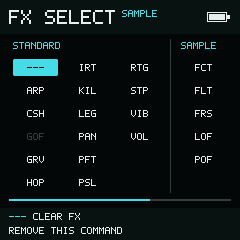
Table uses its own common commands, including IRT and STP, alongside Sample effects.
The highlighted digit corresponds to a step of 1000, 0100, 0010, or 0001. Each command applies its own valid range, so the value may clamp rather than wrap.
Hold Enter and Option together to cut a cell. Cutting an FX command clears its paired value as well.
Select the table and track context
Hold Option without Enter or Shift:
- Left / Right selects the previous or next track, then resolves the relevant Phrase or Instrument table reference on that track.
- Up / Down changes the table ID by
10hexadecimal, wrapping between the0xand1xbanks while preserving the low digit.
The top prefix and table number receive focus while Option is held; the grid cursor does not move.
Selection and clipboard
Begin Selection Mode with , then release Shift and extend the rectangle with the directions.
| Input while selected | Result |
|---|---|
| Expand across all six columns; repeat to select all 16 rows | |
| Option | Copy and exit Selection Mode |
| Cut and exit Selection Mode | |
| Enter + direction | Adjust every selected cell |
| Play | Play the current Phrase context |
Paste with after Selection Mode closes. Table clipboard data remains type-aligned. It can move between P and I Table contexts, and compatible FX command/value pairs can also be transferred between Table and Phrase. NullPerator rejects a command-to-value or NOTE-to-FX reinterpretation.
On the value of a TBL command, the immediate clone gesture—
, keep Shift
held, release Option, then press Enter—
duplicates the referenced table into a free slot and updates that value.
Playback and track state
- Play starts or stops the current Phrase context on the selected track. The Table cursor row does not become a Phrase start row.
- starts or stops the whole Song from the stored Song cursor.
- toggles solo for the selected track.
- toggles mute for the selected track.
- clears all track mutes and solo state.
Page navigation
Hold Shift and use:
- Up → Phrase from a
Ptable, or Instrument from anItable - Right → Instrument Table from Phrase Table
- Left → Phrase Table from Instrument Table