Song and Live
Song is the top level of a NullPerator project. Its grid is an arrangement of chains: each non-empty cell contains the ID of the chain that a track should play at that Song row.
The same screen has two transport behaviors:
- SONG plays the arrangement linearly.
- LIVE cues chains without leaving the grid, so rows can be recombined during a performance.
Hold Option and press either Left or Right to switch between the two. The selector wraps because it contains exactly two choices.
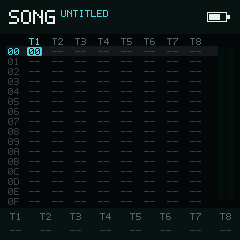
Eight tracks share one 128-row arrangement; sixteen rows are visible at once.
Fields
| Area | Meaning |
|---|---|
SONG / LIVE | Current sequencer mode |
T1–T8 | Eight independent tracks |
00–7F | 128 Song rows; 16 rows are visible at once |
00–FE | Chain IDs |
-- | No chain on this track and row |
| Bottom bar | The most recent live note on each track; editing help and notices temporarily take priority |
| Playback marks | Active and queued positions for each track |
An empty cell is not a rest inside a chain. It means that the Song row does not start a chain on that track.
Try this
- Put the cursor on a filled chain cell and tap Play. Song begins at the selected row; tap Play again to stop.
- Hold Option and tap Left or Right. The title changes from
SONGtoLIVE. - In LIVE, move to another filled cell and tap Play. That chain is queued for the selected track.
- Switch back to SONG with or .
The first-loop walkthrough shows how to create the Phrase and Chain used by a Song cell.
Navigation and chain entry
Use the directions to move through the grid. Moving past the top or bottom of the 16-row window scrolls through the full 128-row Song.
Hold Enter to edit the current chain ID:
| Direction | Change |
|---|---|
| Left / Right | -1 / +1 |
| Down / Up | -10 / +10 in hexadecimal (-16 / +16) |
Release Enter to commit the edit. Holding a direction repeats the change.
Tap Enter to use the last-chain entry behavior:
- On an empty cell, the last selected chain ID is inserted.
- On a filled cell, that ID becomes the last selected chain.
- A second consecutive Enter allocates a new chain and places its ID in the cell.
Hold Enter and Option together to cut the current cell. Enter fills an empty cell immediately, so pressing Option afterward cuts the newly entered value. Holding Option first cuts without filling the cell.
Hold Option and press Up or Down to jump to the previous or next populated section on the current track. Sections are blocks of chain cells separated by empty rows; an entirely empty or gapless track does not jump.
Selection and clipboard
Selection is deliberately order-sensitive so that it can share the same four product keys as mute:
- Hold Shift.
- Press Option to begin a selection at the cursor.
- Release Shift, then use the directions to extend the selection.
The Song clipboard can hold at most the visible 8 × 16 grid. A selection cannot grow beyond 16 rows.
While a selection is active:
| Input | Result |
|---|---|
| Directions | Extend or shrink the selected rectangle |
| First select the full row width; repeat to select the full visible grid | |
| Option | Copy, then leave Selection Mode |
| Cut, then leave Selection Mode | |
| Enter + direction | Adjust every selected cell using the same fine/coarse steps as a single cell |
| Play | Run the current transport action; in LIVE, cue the selected track span |
After copying or cutting, hold Shift and press Enter to paste at the cursor. A clipboard from Chain, Phrase, Table, or Groove is intentionally incompatible with Song and will not be pasted.
Clone a chain
To duplicate the chain referenced by one Song cell, begin selection with , keep Shift held, release Option, and press Enter as the next action. NullPerator allocates a new chain, copies all 16 phrase and transpose rows, and replaces the cell with the new ID.
Playback in Song mode
- Play starts the whole arrangement at the selected Song row; press it again to stop.
- uses the same Song transport while in SONG mode.
- toggles solo for the current track. With a horizontal Song selection, it solos that selected track span.
- Hold Option, then press Shift to toggle mute for the current track or selected track span.
- clears every mute and solo state.
begins a selection. toggles mute. This distinction is intentional.
Playback in Live mode
Live mode uses the selected Song row as a cue source.
- Play cues the chain on the current track. If transport is stopped, Live starts with that track. During playback, the cue normally takes effect at the next chain boundary.
- Press Play again on the same queued item to tighten the cue to the next phrase boundary.
- cues the current track immediately, at the next tick boundary.
- Hold Left, then press Play to cue the current row across all eight tracks.
- During playback, queues the current track to stop. Repeating the chord tightens the stop from a chain boundary to a phrase boundary.
Only playable cells are queued. Empty Song cells are ignored rather than shown as active playback.
Next
Hold Shift and use:
- Right → Chain
- Up → Project
- Down → Mixer
The controls guide maps these shared action names to NullPerator hardware, Web, and iOS.