Mixer
Mixer presents eight track strips and one master strip on a single screen. It is both a live stereo level monitor and a fast place to balance a project.
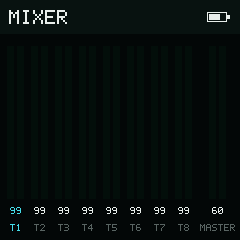
T1–T8 and Master each have stereo level meters and a stored gain.
Channel strips
| Strip | Signal |
|---|---|
T1–T8 | Individual sequencer tracks |
MASTER | The stereo mix after the eight track gains |
Each strip has independent left and right VU bars. The color ramp moves from safe level through warning to peak. Meters represent current activity and return to empty when transport stops; they do not hold stale peaks.
The number below each meter is the stored project gain, from 0 to 99. Track gains default to 99; master gain defaults to 60. Changing a Mixer value marks the project for autosave.
Select and adjust
Use Left and Right to select T1 through T8, then MASTER. Selection stops at the ends rather than wrapping.
Hold Enter and press:
- Up or Right to increase the selected gain by one.
- Down or Left to decrease it by one.
Hold a direction to repeat. Values clamp at 0 and 99.
Mute and solo
- Hold Option, then press Shift to toggle mute on the selected track.
- toggles solo on the selected track.
- clears every mute and solo state.
MASTER is an output gain, not a ninth sequencer track. Mute and solo inputs are ignored when MASTER is selected; clearing all mutes remains available.
Playback and navigation
- Play starts or stops the whole Song at the stored Song cursor.
- performs the same whole-Song transport action.
- returns to Song.
Mixer has no bottom bar, leaving the full height available to the nine stereo meters.