Chain
A chain turns a set of phrases into a longer musical block. Song cells refer to chains; each chain then plays up to 16 phrase rows in order.
NullPerator provides chain IDs 00–FE. Each chain contains exactly 16 rows, 00–0F.
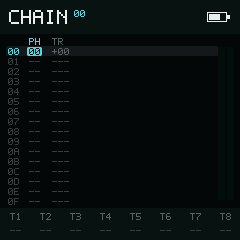
PH references a Phrase; TR offsets it in signed decimal semitones.
Fields
| Column | Meaning | Empty display |
|---|---|---|
PH | Phrase ID 00–FE | -- |
TR | Signed semitone transpose, -99 to +99 | --- when PH is empty |
Transpose is shown in signed decimal. +12 raises the phrase by one octave and -12 lowers it by one octave.
Try this
- Put the cursor on a filled
PHcell and tap Play to hear the Chain from that row. Tap Play again to stop. - Move to its
TRcell, hold Enter, and tap Right once. The transpose becomes+01. - Tap Play again. The Phrase now plays one semitone higher.
- Hold Enter and tap Left to return the transpose to
+00.
Navigation and editing
Directions move the cursor through the fixed 16 × 2 grid. Hold Enter to edit without moving the cursor:
| Column | Left / Right | Down / Up |
|---|---|---|
PH | -1 / +1 phrase | -10 / +10 in hexadecimal (-16 / +16) |
TR | -1 / +1 semitone | -12 / +12 semitones |
The transpose value saturates at -99 and +99; it does not wrap through an unsigned hexadecimal value.
Tap Enter on PH to recall the last phrase ID. A second
consecutive Enter allocates a new phrase and writes its ID into
the row. On TR, Enter recalls the last non-zero transpose.
Hold Enter and Option together to cut the current cell. Cutting PH leaves its transpose data stored but hidden until a phrase is assigned again; cutting TR resets it to +00.
Change context with Option
Hold Option without Enter or Shift:
- Left / Right selects the previous or next track and resolves the chain at the current Song row.
- Up / Down loads the chain from the adjacent Song row on the selected track. If that Song cell is empty or the Song edge has been reached, the Chain view stays where it is.
The top chain ID and the selected track in the bottom bar move with this context. The cell cursor remains on the same Chain row and column.
Selection, copy, and clone
Begin Selection Mode with , then release Shift and extend the rectangle with the directions.
| Input while selected | Result |
|---|---|
| Expand to both columns; repeat to expand to all 16 rows | |
| Option | Copy the selection and exit Selection Mode |
| Cut the selection and exit Selection Mode | |
| Enter + direction | Adjust every selected cell |
| Play | Play the current Chain context |
Paste a copied Chain selection with after Selection Mode has closed. Clipboard data stays column-aligned, so phrase IDs and transposes cannot cross into one another.
To clone one referenced phrase, place the cursor in PH, begin selection with
, keep Shift
held, release Option, and press Enter
immediately. NullPerator allocates a new phrase, copies all of its steps, and
replaces the PH cell with the clone's ID. The clone gesture is not available
in TR.
Playback and track state
- Play starts or stops this chain from the highlighted Chain row, on the selected track.
- starts or stops the whole Song from the stored Song cursor.
- toggles solo for the selected track.
- toggles mute for the selected track.
- clears all track mutes and solo state.
The playback mark follows every track currently using the displayed chain. The bottom bar shows live notes for T1–T8 unless selection, clipboard, or editing help temporarily replaces it.
Next
Hold Shift and press:
- Left → Song
- Right → Phrase