Command reference
Phrase FX1 and FX2, and the three Table command columns, use the same
command catalog, grouped into a fixed directory when you open the selector.
Instrument type controls support hints; only page-specific flow commands are
filtered. A parameter is four hexadecimal nibbles, shown below as aabb,
abcd, or dashes for unused digits. A command that the current player context
or instrument does not implement has no effect.
In the tables below, GB tone means GB-Pulse and GB-Wave; all GB also includes GB-Noise. Noise does not follow note pitch or pitch effects.
| Command | Parameter | Applies to | Implemented behavior |
|---|---|---|---|
--- | ---- | All | No command |
ARP | abcd | Sample, Stack, Chiptune, GB tone | Cycle the original note and up to four relative-pitch offsets from a–d |
CHB | abcd | Stack | Set four chord intervals as signed nibbles: 0–7 are 0–7, 8–F are −8–−1 semitones |
CHD | abcd | Stack | Set four intervals 0–15 semitones below the base note |
CHU | abcd | Stack | Set four intervals 0–15 semitones above the base note |
CSH | aa-b | Sample, Drum, Stack, Chiptune | Sample sets drive from aa and bit-crush from b, leaving zero components unchanged; Drum, Stack, and Chiptune set bit-crush from b immediately, including zero |
DLY | ---b | Phrase note | Delay the note start by b ticks; 0 adds no delay |
FCT | aabb | Sample | Ramp filter cutoff toward bb over aa × 4 tracker ticks; 00 applies immediately |
FLT | aabb | Sample | Set cutoff aa and resonance bb immediately |
FRS | aabb | Sample | Ramp filter resonance toward bb over aa × 4 tracker ticks; 00 applies immediately |
GOF | ---- | SID, OPAL, Drum, Stack, Chiptune, all GB | Release the synth gate/envelope; Drum, Chiptune, and GB stop the voice immediately |
GRV | aabb | Player, Table | Select groove bb; in a Phrase, nonzero aa applies it to all tracks, while a Table uses its local groove |
HOP | Phrase: ---b; Table: aa-b | Phrase, Table | Phrase uses only destination step b, with no repeat count. Table hops to step b aa times; aa = 00 repeats indefinitely. The third digit is unused |
IRT | --bb | Table | Retrigger the current instrument with signed 8-bit semitone offset bb |
KIL | --bb | Player, Table | Stop the active voice after bb ticks |
LEG | aabb | Sample, MIDI, Stack, Chiptune, GB tone | Slide toward pitch target bb at speed aa; MIDI uses its curved pitch-bend path |
LOF | aaaa | Sample | Shift loop start and end together by the signed offset, within sample bounds |
MCC | aabb | MIDI | Send Control Change number aa with value bb; both become 7-bit MIDI values |
MCH | abcd | MIDI | Add four scale-aware chord offsets; a zero nibble omits that added note |
MPC | --bb | MIDI | Send Program Change bb as a 7-bit value |
PAN | aabb | Sample, Stack, Chiptune, all GB | Sample ramps pan toward bb over aa × 4 tracker ticks. Stack, Chiptune, and GB move by aa units per 10 ms. Zero aa applies immediately; bb = 00 is right |
PFT | aabb | Sample, Stack, Chiptune, GB tone | Fine-tune toward bb at speed aa, over approximately ±1 semitone |
POF | aabb | Sample | If aa is nonzero, jump to absolute fraction aa/256, then add signed relative fraction bb/256; position wraps |
PSL | aabb | Sample, MIDI, Stack, Chiptune, GB tone | Slide toward pitch target bb at speed aa; MIDI uses its linear pitch-bend path |
RTG | aabb | Sample, MIDI | Retrigger every bb ticks; Sample advances by offset aa per repeat, while MIDI ignores aa |
SIP | aabb | Stack, Chiptune, all GB | Set voice parameter aa to byte bb; see the parameter maps below |
STP | ---- | Table | Stop the current Table playback |
TBL | --bb | Player | Start Table 00–1F for the current track |
TPO | aabb | Player | Set tempo from 16-bit hexadecimal aabb, clamped to 60–400 BPM (003C–0190) |
VEL | --bb | MIDI | Set following MIDI Note On velocity, limited to 00–7F |
VIB | aabb | Sample, Stack, Chiptune, GB tone | Set vibrato rate aa and depth bb; 0000 disables the modulation |
VOL | aabb | Sample, MIDI, Drum, Stack, Chiptune, all GB | Sample ramps volume toward bb over aa × 4 tracker ticks; MIDI sends CC 7 from bb/2; Drum, Stack, and GB set volume to bb immediately. MIDI, Drum, Stack, and GB ignore aa. Chiptune ramps over aa × 10 ms; zero aa applies immediately |
Choose an available command
Hold Enter on an FX mnemonic to open FX Select. Directions move through columns of six commands without wrapping. Up and Down choose a command within a column; Left and Right choose an adjacent column. A move into a shorter column lands on its last command. Release Enter to return to the Phrase or Table. Opening and closing the selector alone leaves the command and its parameter unchanged.
Standard on the left contains the page's common commands and the shared
musical effects: ARP, CSH, GOF, LEG, PAN, PFT, PSL, RTG, VIB,
and VOL. Every instrument shows these effects. Unsupported effects are grey
and selectable; their two-line help reads Not Supported / On This
Instrument. Selecting one does not add playback support to that instrument.
--- clears the cell.
The directory always has four groups, in this order. Each command appears once:
| Group | Commands |
|---|---|
| Standard | Page flow commands and the shared musical effects listed above |
| Sample | FCT, FLT, FRS, LOF, POF |
| MIDI | MCC, MCH, MPC, VEL |
| Synth | CHB, CHD, CHU, SIP |
All four groups remain accessible for every instrument. For example, you can
choose MCC while editing a Sample track's shared Table; it stays grey until
played by MIDI. Selecting a command never changes the instrument type.
The top bar shows the current instrument type. Directions move directly between commands, without a separate group-selection mode. The list scrolls horizontally when needed; labels and dividers move with the columns. Commands keep their positions when the instrument changes. The bottom bar shows two lines of help.
The following table lists actual playback support, across all groups:
| Context | Supported commands |
|---|---|
| Phrase common | DLY, GRV, HOP, KIL, TBL, TPO |
| Table common | GRV, HOP, IRT, KIL, STP |
| Sample | ARP, CSH, FCT, FLT, FRS, LEG, LOF, PAN, PFT, POF, PSL, RTG, VIB, VOL |
| MIDI | LEG, MCC, MCH, MPC, PSL, RTG, VEL, VOL |
| SID / OPAL | GOF |
| Drum | CSH, GOF, VOL |
| Stack | ARP, CHB, CHD, CHU, CSH, GOF, LEG, PAN, PFT, PSL, SIP, VIB, VOL |
| Chiptune | ARP, CSH, GOF, LEG, PAN, PFT, PSL, SIP, VIB, VOL |
| GB-Pulse / GB-Wave | ARP, GOF, LEG, PAN, PFT, PSL, SIP, VIB, VOL |
| GB-Noise | GOF, PAN, SIP, VOL |
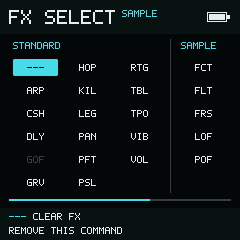
Standard contains shared musical effects and Phrase commands. Sample filter and offset commands appear next; MIDI and Synth remain accessible by scrolling right.
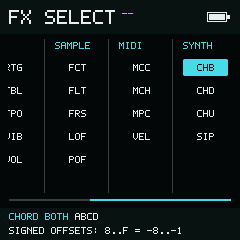
The directory has the same order with or without an instrument reference. The top bar shows -- when its type cannot be resolved.
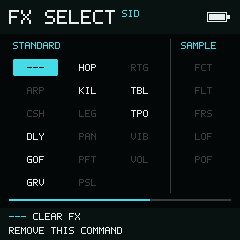
SID shows the same Standard list. Its supported GOF command is bright; unsupported musical effects are grey.
--- is always available. In a Phrase, a blank INS inherits the nearest
explicit instrument at or above that row in the same phrase. If none exists,
the type label reads -- and instrument support is unresolved. The directory
remains complete; it does not guess which instrument might arrive from a different
phrase during playback.
A Phrase Table follows the effective instrument on the invoking TBL row. An
Instrument Table follows the instrument whose table assignment matches the open
table. If you browse to an unrelated table or enter without a matching reference,
the instrument context is unresolved and the top bar shows --.
Shared tables may behave differently when played by another instrument.
Changing an instrument or pasting an FX does not remove or convert existing
commands. Opening the selector focuses the current command at its normal position
in the directory, including an unsupported command. It is never moved before
--- or duplicated. Unsupported selections use an outline, with Not Supported
and On This Instrument in the help bar. They remain selectable after reopening.
Phrase-only commands (DLY, TBL, TPO) and Table-only commands (IRT, STP)
are normally omitted on the other page. If an existing cell contains one from the
other page, it is retained in its alphabetic Standard position for that gesture.
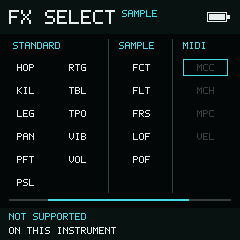
A MIDI command remains in the project after switching to Sample. The selector explains that Sample cannot execute it.
Unselected incompatible FX pairs are also dimmed in the Phrase/Table grid. Unsupported commands have no effect on that instrument during playback. Command IDs, parameters, and saved project data keep their existing meaning. Play has no action while the selector is open.
Voice parameter commands
SIP aabb changes the playing voice on that track. It does not rewrite the
instrument settings. A new note trigger restores the saved parameters. Unknown
parameter indices are ignored. Values below use hexadecimal indices and ranges;
signed bytes use two's complement (FF = −1, 80 = −128).
While selecting or editing SIP, the help bar resolves the high byte against the
actual instrument type and shows its parameter name, current value, and range.
For example, SIP 0300 shows 03 Attack on Stack and 03 Noise Burst on
Chiptune. An unknown parameter index is labelled as ignored. With an unresolved
instrument, help explains that the parameter map depends on the instrument.
In Phrase and Table, holding Enter on the four-digit value keeps this
information visible beside compact Digit / Value controls. The parameter
number and name are highlighted while you edit aa; the value is highlighted
while you edit bb. The name updates immediately when aa changes. For an
unresolved instrument, the editing bar shows Parameter aa instead of an
engine-specific name.
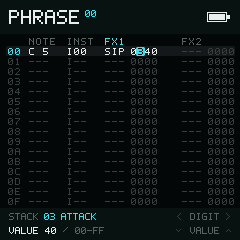
Hold Enter on the value and select either digit in aa to highlight the parameter number and name.
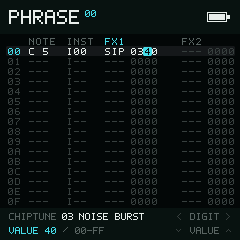
Moving to bb highlights the value. Parameter 03 is Noise Burst on Chiptune and Attack on Stack.
aa | Stack parameter | Chiptune parameter |
|---|---|---|
00 | Wave, 00–06 | Wave, 00–07 |
01 | Transpose, signed semitones | Transpose, signed semitones |
02 | Voice volume, 00–FF | Voice volume, 00–FF |
03 | Attack, 00–FF | Noise burst length, 00–FF |
04 | Decay, 00–FF | Arpeggio speed, 00–22 |
05 | Sustain, 00–FF | Length, 00 = unlimited |
06 | Release, 00–FF | Attack, 00–FF |
07 | Spread, 00–FF | Decay, 00–FF |
08 | Brightness, 00–0C | Automatic vibrato delay, 00–FF |
09 | Pitch decay, 00–FF | Vibrato depth, 00–FF |
0A | — | Sweep time, 00–FF |
0B | — | Sweep amount, signed byte |
GB types use a different SIP parameter map:
00 is duty on Pulse, output level on Wave, and noise shape on Noise. All use
02 for volume and 03 for length. Pulse/Noise use 04 for the envelope;
Pulse also uses 05 for sweep. Wave indices 10–2F edit its 32 individual
4-bit samples. GB-Noise has no transpose parameter.
For example, SIP 010C transposes a Stack or Chiptune voice up an octave.
CHU 047C sets a major chord with an octave; CHB C047 sets the additional
voices to −4, 0, 4, and 7 semitones. SIP transpose preserves the current chord.
Stack ARP transposes the whole chord once per tracker tick. Chiptune ARP
uses its ARP SPEED field: higher values are faster. For both, the base note
is included and trailing zero nibbles are omitted; ARP 0000 returns to the
base pitch.
On Stack, Chiptune, GB-Pulse, and GB-Wave, PSL interprets bb as a signed semitone target relative
to the base pitch. LEG aa00 starts from the previous sounding pitch and returns
to the new note's pitch. PFT interprets signed bb as a fraction of a semitone
(128 units per semitone). These slides take aa control ticks at 100 Hz;
aa = 00 applies the target immediately. Their pitch modulation can combine
with chord offsets, arpeggio, and vibrato.
Synth PAN uses 00 for right, 80 for center, and FF for left. aa is the
step size at 100 Hz; zero applies immediately. VIB timing is independent of
song tempo. Depth ranges differ: Sample's maximum changes playback rate by
about ±25%; Stack, Chiptune, GB-Pulse, and GB-Wave use roughly one semitone at full depth.
GB-Pulse and GB-Wave advance ARP on tracker ticks, like Stack. GB VOL
always applies its low byte immediately; only Chiptune implements the
aa × 10 ms volume ramp. GB pitch is quantized by its period calculation,
so a smooth change in the target need not produce a smooth frequency change.
New commands use additional NullPerator IDs; existing commands, including MIDI
MCH, keep their IDs. Existing projects load without conversion. Projects that
use Chiptune or the new commands need this firmware or later; these additions do
not provide direct compatibility with copingTracker project files.
The selector filter itself does not change playback. Newly implemented effects
can change the sound of existing steps that already contained an unsupported
command: for example, Stack now executes an ARP that older versions ignored.
The command and parameter remain exactly as stored.
HOP: destination and repeats
The selector help follows the page. Phrase shows HOP ---b: only the last
hexadecimal digit chooses a destination row, 0–F; the first three digits
have no effect. When playback reaches a HOP row, Song/Chain playback advances
to that row in the next phrase. Phrase playback jumps within the current phrase.
There is no Phrase repeat count.
Table shows HOP aa-b. For example, HOP 02A5 jumps to row 5 twice,
then falls through to the next row on the third visit. A is unused. HOP 00A5
keeps jumping to row 5. While editing, the bar shows Repeat 02 and
Step 5; selecting the unused third digit keeps both values visible.
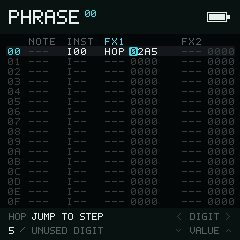
An unused digit is marked explicitly. The displayed jump destination stays 5.
Sample VOL, PAN, FCT, and FRS show Time for the high byte: increasing
it lengthens the ramp (01 is four tracker ticks). Chiptune VOL and
Stack/Chiptune pitch slides use 10 ms units. These descriptions reflect the
existing playback behavior; they do not change stored commands or timing.
Editing command fields
Left and Right move between a command mnemonic and its parameter field. Changing a mnemonic updates the help text for that command. Hold Enter on a parameter to address and adjust an individual hexadecimal digit.
Parameters are hexadecimal even when their musical meaning is a decimal count.
For example, TPO 0078 is 120 BPM and KIL --0C is 12 ticks.
While you hold Enter, the left side of the two-line bottom bar explains the
current command's fields and values. Digit / Value controls stay on the
right. The field containing the focused digit is highlighted. For paired-byte
commands, both fields remain visible: Sample VOL shows Time / Volume,
FLT shows Cutoff / Resonance, and MIDI MCC shows CC / Value.
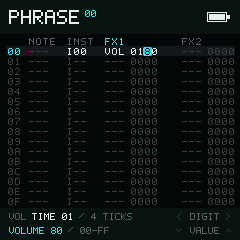
Moving between the two bytes highlights the field you are changing.
The explanation follows the active instrument and page. MIDI VOL shows its
outgoing CC 7 value; Drum, Stack, and GB VOL use only the low byte. Table HOP
shows the repeat count and destination step, while Phrase HOP uses only the
destination step. An unresolved instrument uses Per engine for fields whose
behavior depends on the eventual instrument.
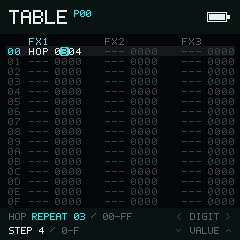
Table HOP exposes both the repeat count and destination without hiding the edit controls.
Whole values can show their decoded meaning: TPO 0078 displays 120 BPM,
including the player's 60–400 BPM clamp. MIDI fields show the effective 7-bit
values. Arpeggios and chords show individual offsets and highlight the one being
edited; a dash marks an omitted note. These explanations do not rewrite the
stored hexadecimal value.
Selecting an unused digit shows Unused digit while preserving the actual
parameter values. The unused digit never replaces a displayed jump destination,
volume, or other target. GOF and STP show
No parameter. Unsupported commands keep Not Supported / On This
Instrument beside the controls. Empty FX cells keep the plain editing legend.
Context details
- Phrase commands are evaluated with the Phrase note on the same step.
DLYtherefore affects note start timing rather than delaying the command row. KILin a Table schedules the same player-side delayed stop as PhraseKIL; it is not forwarded to an instrument for an immediate stop.STPstops Table processing safely from any command column.- Table columns advance independently.
HOPandSTPoperate on Table playback state, while instrument commands are forwarded to the instrument. GRVin a Table masks the selected groove to the available00–1Frange.IRTinterprets80–FFas negative offsets. For example,FFis −1 semitone.- Pitch targets and speeds preserve the historical tracker command encoding; they are not MIDI cents or milliseconds.