Your project
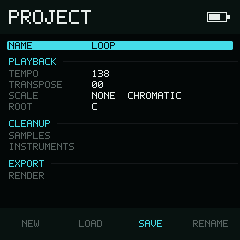
Project keeps song-wide values and maintenance actions in one scrollable list.
A project contains one complete song: its patterns, arrangement, instruments, samples, timing, and mixer settings.
Device brightness, themes, and the shared sample library are separate. Changing them does not change your song.
What you can change here
Use Up and Down to choose a row. Use Left and Right to change a value or choose an action in the bottom bar, then press Enter to run it.
| Section | What it does |
|---|---|
| Name | New, Load, Save, or Rename a project |
| Playback | Set Tempo, Transpose, Scale, and Root |
| Cleanup | Browse samples or remove sounds that are not used |
| Export | Render a mixdown or separate track stems |
Project names
Names may contain up to 16 characters. They cannot be empty or contain / or
\. NullPerator keeps the letter case you enter.
A new project asks for a name the first time you save it.
See Create, load, save, and delete for the everyday project workflow. See Files and compatibility only when you want to move or back up files by hand.
Playback values
Change these directly with Left and Right. Hold Enter and use Up or Down for a larger step on numeric values.
| Row | Left / Right | or | Range |
|---|---|---|---|
| Tempo | ±1 BPM | ±10 BPM | 60–400 BPM |
| Transpose | ±1 semitone | ±12 semitones | −48–+48 |
| Scale | Previous / next, wrapping | Previous / next | 44 choices |
| Root | Previous / next, wrapping | Previous / next | C–B |
See Scales for every Scale choice.