Stack
Stack layers five oscillators into one sound on one track. Play a single Phrase note and use CHORD to add intervals, or SPREAD to detune the layers. It makes sound without loading a sample.
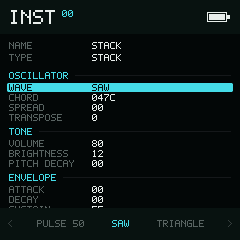
Choose a waveform, then shape the five oscillator layers with CHORD and SPREAD.
Try a chord
- Open an instrument and use Left / Right on Type to choose
STACK. - Leave WAVE at
SAWand CHORD at047C. - Return to Phrase with and enter a note using this instrument.
- Hold Enter on the note to hear a major chord. Release it to stop the preview.
- Return to Instrument and raise SPREAD slightly to hear the layers detune.
Wave and chord
WAVE offers PULSE 12.5, PULSE 25, PULSE 50, SAW, TRIANGLE,
ORGAN, and VOX.
One oscillator plays the base note. Each of the four CHORD digits adds
another oscillator at an interval of 0–F semitones above it (0–15 in
decimal). These digits are intervals, not instrument numbers.
| CHORD | Result |
|---|---|
0000 | All five oscillators in unison; use SPREAD for detuning |
047C | Base note plus 0, 4, 7, and 12 semitones: a major chord with an octave |
037C | Base note plus 0, 3, 7, and 12 semitones: a minor chord with an octave |
Hold Enter, choose a CHORD digit with Left / Right, and change it with Up / Down.
Parameters
The list is grouped into Oscillator, Tone, Envelope, and Modulation. Use the vertical directions to move through the fields.
Two-digit values below are hexadecimal unless marked decimal.
| Field | Range | Default | Use |
|---|---|---|---|
| SPREAD | 00–FF | 00 | Detune the oscillator layers |
| TRANSPOSE | −24–24, decimal | 0 | Shift the whole sound in semitones |
| VOLUME | 00–FF | 80 | Set the instrument level |
| BRIGHTNESS | 0–12, decimal | 12 | Control the harmonic content; higher is brighter |
| PITCH DECAY | 00–FF | 00 | Set the pitch-decay effect |
| ATTACK | 00–FF | 00 | Shape the start of the volume envelope |
| DECAY | 00–FF | 00 | Shape the transition to the sustain level |
| SUSTAIN | 00–FF | FF | Set the held level |
| RELEASE | 00–FF | 00 | Shape the tail after Note Off |
| TABLE | OFF or a table number | OFF | Assign a Table |
| AUTOMATION | NO / YES | NO | Enable table automation |
Use Left / Right for normal value changes. Hold Enter and press Up / Down for the larger step shown by the field. TRANSPOSE uses an octave for its larger step.
Playback tips
CHORD layers belong to one note trigger; they are not independently sequenced tracks. A new note on the same track replaces that voice. Use another track if you need independently overlapping notes.
Note Off starts the release stage; KIL stops the voice after its specified
tick delay. Use CHU, CHD, or CHB to change chord intervals on a Phrase or Table step,
and SIP to change a voice parameter without editing the saved instrument.
Stack also supports ARP, VIB, PAN, PSL, LEG, PFT, VOL, and the low
digit of CSH for bit crushing. The drive part of CSH is not used. See the
command reference for encodings,
parameter indices, and timing.
See Tables for sequencing a Table and Choose an instrument for saving or importing a sound.
Credits
The Stack instrument is adapted from copingTracker by n1LS. Thanks to n1LS for the original instrument.