SID instrument
The SID instrument drives one oscillator of NullPerator's emulated SID chip. Any of the 64 instrument slots can hold a SID preset, but all SID presets share the same three oscillators. More presets do not create more SID voices.
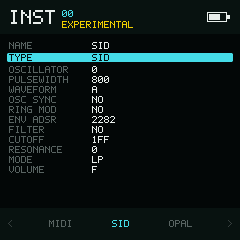
Voice settings and the shared SID filter live in one scrollable list.
Parameters
| Field | Values | Default | Behaviour |
|---|---|---|---|
OSCILLATOR | 0–2 | 0 | SID voice used by this instrument. |
PULSEWIDTH | 000–FFF | 800 | Duty cycle of pulse-containing waveforms. |
WAVEFORM | Nine choices | Triangle | Off, triangle, saw, triangle+saw, pulse, triangle+pulse, saw+pulse, triangle+saw+pulse, or noise. |
OSC SYNC | NO, YES | NO | Hard-syncs the oscillator to the preceding SID oscillator. |
RING MOD | NO, YES | NO | Enables ring modulation. |
ENV ADSR | Four cells, each 0–F | 2 2 8 2 | ATK, DEC, SUS, and REL: attack, decay, sustain, and release. |
FILTER | NO, YES | NO | Routes this oscillator through the SID filter. |
CUTOFF | 000–7FF | 1FF | Shared SID filter cutoff. |
RESONANCE | 0–F | 0 | Shared filter resonance. |
MODE | LP, BP, HP, NOTCH | LP | Shared filter response. |
VOLUME | 0–F | F | Shared SID chip output volume. |
The list is grouped into Oscillator, Envelope, and Filter & Output.
The Envelope divider carries ATK / DEC / SUS / REL column headers, with
four value cells on the ENV ADSR row below it.
On ENV ADSR, use Left / Right without a
modifier to choose a cell, as on Drum's grid. Hold Enter and
press Left / Right for a small change, or
Up / Down for a large change. Each cell clamps
to 0–F; the bottom bar shows the hexadecimal steps ±1 / ±10.
Shared state
CUTOFF, RESONANCE, MODE, and VOLUME represent chip-wide registers. Changing any of them on one SID instrument changes the value seen by the other SID instruments. FILTER remains per oscillator because it controls whether that voice is routed into the shared filter.
Assign three instruments different OSCILLATOR values when you want a conventional three-voice patch. Two instruments targeting the same oscillator overwrite the same SID voice state. Additional presets can provide alternate settings for those oscillators.
Note range
The emulated SID frequency table accepts the displayed range C2–B9 (stored notes 24–119). Notes outside that range are rejected rather than wrapped. Older builds labelled the same stored notes C0–B7; playback pitch is unchanged.