OPAL instrument
OPAL is a two-operator FM synthesizer inspired by OPL-era PC sound hardware. Each instrument is monophonic. Any of the 64 instrument slots can hold an OPAL preset, subject to available memory; there is no fixed three-preset limit.
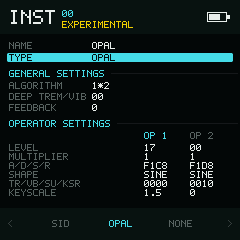
General settings lead into two aligned operator columns.
Instrument settings
| Field | Values | Default | Behaviour |
|---|---|---|---|
ALGORITHM | 1*2, 1+2 | 1*2 | Serial FM (operator 1 modulates 2) or parallel/additive output. |
DEEP TREM/VIB | Two bits | 00 | Global deep-tremolo and deep-vibrato flags. |
FEEDBACK | 0–7 | 0 | Feedback amount for operator 1. |
For DEEP TREM/VIB, hold Enter, choose the tremolo or vibrato bit with Left / Right, and toggle it with Up / Down.
Operator settings
The blue Operator Settings divider shares a row with OP 1 and OP 2. The active operator header highlights only while an operator field is focused. The two operators appear side by side below it. Up / Down moves by row. Left / Right without Enter switches operator columns; hold Enter while changing the selected operator's value.
| Field | Values | OP1 default | OP2 default | Behaviour |
|---|---|---|---|---|
LEVEL | 00–3F | 17 | 00 | Output attenuation: 00 is loudest and 3F is quietest. |
MULTIPLIER | 0–F | 1 | 1 | Operator frequency multiplier. |
A/D/S/R | Four hex digits | F1C8 | F1D8 | Attack, decay, sustain, and release. |
SHAPE | Eight choices | SINE | SINE | SINE, HALF, ABS, PULS, EVEN, AB-E, SQR, or DSQR. |
TR/VB/SU/KSR | Four bits | 0000 | 0010 | Tremolo, vibrato, sustained envelope, and key-rate scaling flags. |
KEYSCALE | 0, 1.5, 3, 6 | 1.5 | 0 | Selects the displayed high-note attenuation curve. |
A/D/S/R and TR/VB/SU/KSR are component fields: hold Enter, select a digit or bit with Left / Right, then edit it with Up / Down.
Voice behaviour
One OPAL instrument owns one synth channel. If the same instrument number is triggered by several tracker tracks, a later note replaces the earlier note. Allocate another OPAL slot for another simultaneous voice.