MIDI instrument
A MIDI instrument sends sequenced notes and commands to an external MIDI destination. It produces no audio inside NullPerator. Configure the active MIDI connection on the Device page before using it.
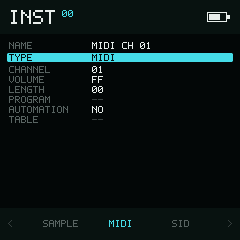
MIDI instrument values are stored with the project and sent to the selected output.
Any of the 64 instrument slots can hold a MIDI preset. This does not add MIDI channels: the selected output still uses channels 1–16. If several presets target one channel, the highest-numbered slot with an enabled Program or nonzero Volume supplies that channel's corresponding playback-start setting.
Send your first note
- Connect MIDI and choose the output as described in MIDI setup.
- Set the instrument Type to
MIDI. - Set
CHANNELto the receiving instrument's channel. - Optionally choose a
PROGRAM. - Return to Phrase, enter a note with this instrument, and press Play.
If nothing sounds, check the receiving device's channel, volume, and MIDI input indicator before changing Phrase data.
Parameters
Output groups Channel, Volume, Length, and Program; Modulation contains Table and Automation. Use the vertical directions to move through the fields.
| Field | Values | Default | Behaviour |
|---|---|---|---|
CHANNEL | 01–16 decimal | 01 | MIDI channel. The display is decimal even when nearby values are hexadecimal. |
VOLUME | 00–FF | FF | At playback start, a non-zero value sends CC 7 scaled to MIDI's 0–127 range. 00 leaves the receiver's current volume unchanged. |
LENGTH | 00–FF | 00 | Gate length in tracker ticks. 00 holds until another event stops the note. |
PROGRAM | --, 00–7F | -- | Program Change sent at playback start. -- disables start-time Program Change; choosing a numeric program while playing sends it immediately. |
AUTOMATION | NO, YES | NO | Advances the attached table on instrument triggers when enabled. |
TABLE | --, 00–1F | -- | Table attached to this instrument. Enter assigns the first free table. |
VOLUME controls MIDI CC 7, not Note On velocity. Notes initially use velocity 127; tracker FX can change velocity for subsequent notes.
When notes stop
When a phrase triggers the instrument, NullPerator sends Note On on the chosen
channel. A non-zero LENGTH sends Note Off after that many ticks. Stopping
playback also stops notes that are still held.
Program Change and volume setup are sent when playback starts. This makes a project reproducible, but it can also change the state of connected hardware; save the external device's patch before testing an unfamiliar project.
Tables and MIDI FX
The attached table can sequence velocity, CC, program change, pitch movement, chords, and retriggering. If connected gear misses events, reduce very dense CC automation or large simultaneous chords.